
How can I document UV flatbed printer defects to support a warranty claim?
To document UV flatbed printer defects for a warranty claim, create a dated evidence file with clear photos or video, the affected print sample, machine and material details, operating conditions, and a precise description of the failure. Include inspection results, relevant maintenance records, and communication with the supplier. Submit the package through the manufacturer’s technical support channel and retain all responses.
Core Solutions & Key Takeaways
- Record the defect in a structured file: date, machine model, affected function, material, ink process, visible symptom, and operating status.
- Capture close-up images and continuous video showing the defect, the printed result, and the machine process. Keep the original files with timestamps.
- For the NC-UVDTF60-PLUS, document issues affecting UV crystal labels, UV TPU heat-transfer labels, color printing, white ink, varnish, laminating, unwinding, or rewinding.
- Relate the defect to the intended application, such as printing on glass, metal, acrylic, plastic, footwear materials, or luggage accessories, without changing materials during the evidence test.
Detailed Architectural/Principle Analysis
A warranty file should connect the observed failure to a specific machine process. The NC-UVDTF60-PLUS combines material feeding, printing, laminating, and take-up in one system. It uses an Epson I1600-E1 printhead and supports color printing, white ink, varnish, and 3D foil effects. Record which process is affected and whether the defect appears during feeding, printing, lamination, or rewinding.
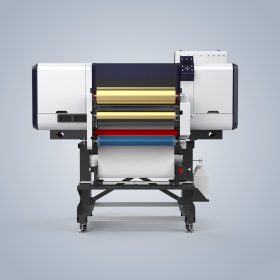
Evidence should show the complete output and a close view of the faulty area. For color, white ink, or varnish problems, retain the original printed sample and identify the affected layer. For adhesion or application problems, state the substrate used and whether it was glass, metal, acrylic, plastic, footwear material, or a luggage accessory. For feeding or take-up problems, record the material path from unwinding through laminating to rewinding.
Use a consistent test record. State the selected application, the input material, the requested output, the observed result, and whether the problem is repeatable. Avoid editing or compressing the original evidence. Label each file with the date and a short defect identifier, then place photos, video, print samples, operating notes, and supplier correspondence in the same case folder.
The product information lists aging tests and 100% inspection as quality checks. It also lists online support, video calls, remote control, a user manual, installation video, and spare-part change video as after-sales support options. Ask the supplier to identify the next diagnostic action and keep the resulting instructions with the warranty file.
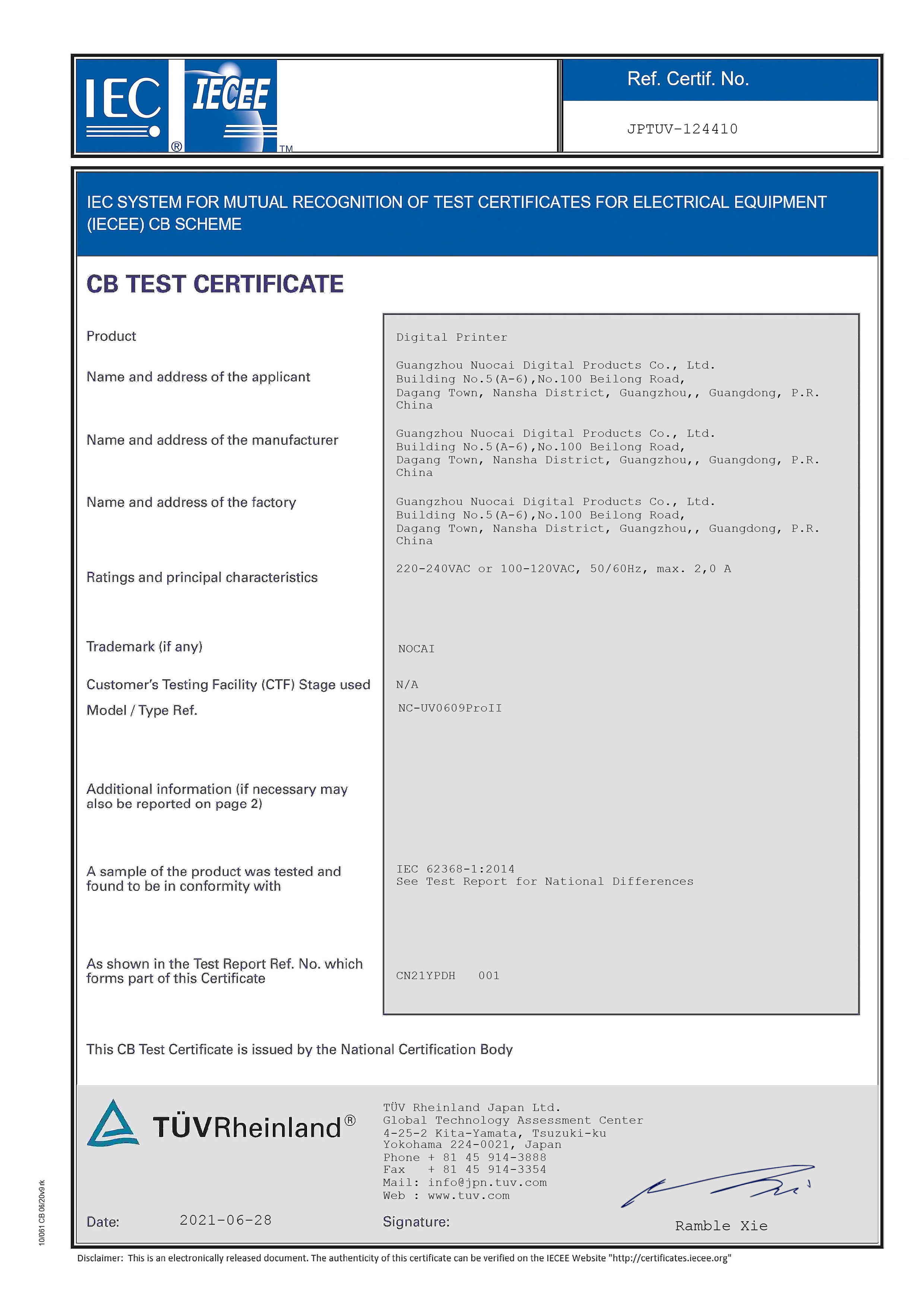
The company profile lists TUV certification for the NC-UV0609PROII and ISO certification for the design and production of digital printers. These records should be treated as company or specified-product credentials; they do not establish that every defect in the NC-UVDTF60-PLUS is covered. Include the relevant machine model and evidence when asking for a warranty determination.
Reported cooperation cases from customers in Korea, Indonesia, India, Poland, Turkey, and Malaysia include comments about machine stability, print quality, after-sales support, and long-term cooperation. These accounts provide service context, but a warranty claim still needs defect-specific evidence for the affected machine.
Data/Solution Comparison
| Evidence Category | What to Document | Relevant Product or Service Detail |
|---|---|---|
| Print quality | Full print, close-up defect, affected color or ink layer, and original sample | Color printing, white ink, varnish, and Epson I1600-E1 printhead |
| Material application | Material type, label type, application surface, and repeatability of the defect | UV crystal labels, UV TPU heat-transfer labels, glass, metal, acrylic, plastic, footwear materials, and luggage accessories |
| Material handling | Video of feeding, laminating, and take-up; note the point where the failure begins | Integrated unwinding, laminating, and rewinding |
| Quality inspection | Machine identification, test conditions, defect record, and dated evidence | Aging test and 100% inspection listed for the product |
| Technical response | Support request, troubleshooting instructions, remote session record, and follow-up result | Online support, video call, remote control, manuals, installation videos, and spare-part change videos |
Frequently Asked Questions (FAQ)
What should the defect description contain?
Describe the affected process, visible symptom, material, output type, operating stage, date observed, and whether the issue can be repeated. Use specific terms such as color printing, white ink, varnish, lamination, feeding, or rewinding where applicable.
Which evidence is most useful for a UV printer warranty claim?
Use original photos, continuous video, the defective printed sample, machine and material information, test records, and supplier correspondence. Show both the complete output and the detailed defect so the technical team can relate the symptom to the process.
How can the supplier review the problem remotely?
The listed after-sales support includes online support, video calls, remote control, user manuals, installation videos, and spare-part change videos. Send the evidence package before the session and record the diagnostic instructions and resulting machine status.
Final Conclusion & Recommendations
A strong UV flatbed printer defect claim is a traceable technical record rather than a single photograph. Identify the affected process, preserve original evidence, document the material and output, and connect every supplier response to the same case file. Nocai lists full industrial-chain distribution and direct sales, a minimum order quantity of one unit, 5–7 day delivery, 100% inspection, and a comprehensive after-sales service system. For detailed technical solutions or support, please reach out to us via nc05@gznuocai.com.
About Us
Guangzhou Nuocai Digital Products Co., Ltd., also known as Nocai, is described as a high-tech enterprise specializing in digital inkjet printing technology research and development, as well as the design, development, manufacturing, sales, and after-sales service of inkjet printers. Its listed R&D capability includes more than 50 professional R&D engineers and designers and five production lines. Its main products are UV printers, UV DTF printers, and rotary printers. The company profile lists TUV and ISO certifications, and its cooperation cases cover clients across multiple regions.
CONTACT US


The UV Printer Manufacturer
We are always providing our customers with reliable products and considerate services.
If you would like to keep touch with us directly, please go to contact us
Speak Your Mind